Dye Sublimation Supplies and Support

  • Home
  • Dye Sublimation Ink
    • Sensient ElvaJet
      • Sensient S4 Subli
        • Sensient S4 Fluorescent
          • Sensient Vibra Brite
          • Eco Solvent Ink
          • Transfer Paper
          • Cut Sheet Paper
          • ICC Profiles
          • Technical Tips
          • Printers
            • Mimaki JV33
              • Mimaki JV5
                • Mutoh Printers
                  • Used JV4 Printers for Sale
                    • Refurbished JV5 Printers
                    • Ink Chip Bypass System
                    • Printing Services
                    • Printer Maintenance
                    • Contact

                    Dye Sublimation Printing Tips

                    Picture
                    • File dimensions – set up the file at full size of the output. Include ½” outside trim marks for areas that bleed. 

                    • Fabric Shrinkage - if transferring dye sublimation ink onto fabric, be sure to take any shrinkage into consideration in your size specifications.

                    • ICC Profile - Use an ICC profile appropriate to your dye sublimation print environment. 

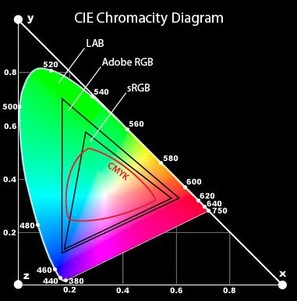
                    • Document color mode – If you are using RIP software, use the RGB color mode for your graphics files. Let the RIP convert from RGB to CMYK.

                    • Graphics – vector graphics are preferred.

                    • Non-vector images, such as photographs:
                    • Must be at least 150 dpi at final print size. Never use low resolution images; resizing a low resolution image to a larger size will decrease its quality.
                    • Check resolution of your file by viewing the graphic at full size (zoom to 100%) on your computer screen. If the image looks unfocused, posterized or pixilated, the resolution is too low.
                    • May require the use of a special ICC output profile with severe limits on black substitution for gray.
                    • Should be converted to RGB.
                    • Layers – do not flatten your file. Keeping layers intact allows the RIP to use all the information in the file while printing.

                    • Fonts – it may be preferable to convert all fonts to outlines


                    Additional Dye Sublimation and Graphics Tips

                    Adobe
                    • Color Management
                    • RGB versus CMYK
                    • Gradients
                    • Posterization
                    • ICC Profiles
                    • Be sure to consult the Adobe Forums

                    CIE